Kotlin Flow Zip Operator for Parallel Multiple Network Calls
- Authors
- Name
- Amit Shekhar
- Published on


The zip operator in Kotlin Flow combines the emissions of two flows together using a function, and emits one item for each pair. We can use it to make multiple network calls in parallel and get both results together.
In this blog, we will learn about the Kotlin Flow Zip Operator and how to make multiple network calls in parallel using it.
This blog is a part of the series I have written on Flow API in Kotlin:
- Mastering Flow API in Kotlin
- Creating Flow Using Flow Builder in Kotlin
- Terminal Operators in Kotlin Flow
- Cold Flow vs Hot Flow
- StateFlow and SharedFlow
- Long-running tasks in parallel with Kotlin Flow
- Retry Operator in Kotlin Flow
- Retrofit with Kotlin Flow
- Room Database with Kotlin Flow
- Kotlin Flow Zip Operator for Parallel Multiple Network Calls - YOU ARE HERE
- Instant Search Using Kotlin Flow Operators
- Exception Handling in Kotlin Flow
- callbackFlow - Callback to Flow API in Kotlin
- Unit Testing ViewModel with Kotlin Flow and StateFlow
I am Amit Shekhar, Founder @ Outcome School, I have taught and mentored many developers, and their efforts landed them high-paying tech jobs, helped many tech companies in solving their unique problems, and created many open-source libraries being used by top companies. I am passionate about sharing knowledge through open-source, blogs, and videos.
I teach AI and Machine Learning, and Android at Outcome School.
Join Outcome School and get a high-paying tech job:
Let's get started.
First, let's understand what is a zip operator in Kotlin Flow.
What is a zip operator in Kotlin Flow?
Zip Operator is an operator that combines the emissions of two flow collections together via a specified function and emits single items for each combination based on the results of this function.

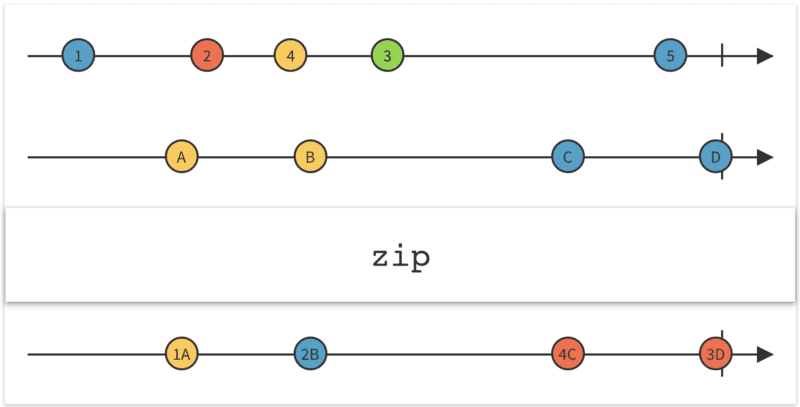
Let's understand the marble diagram with the example code:
val flowOne = flowOf(1, 2, 3)
val flowTwo = flowOf("A", "B", "C")

flowOne.zip(flowTwo) { intValue, stringValue ->
    "$intValue$stringValue"
}.collect {
    println(it)
}
The output will be the following:
1A
2B
3C
Planning your move into AI?
No matter which tech domain you work in today, with your effort, you can transition to these roles:
- AI Engineer
- Forward Deployed Engineer
- AI Agent Engineer
- Harness Engineer
- Voice AI Engineer
- AI Architect
- LLM Engineer
- LLM Inference Engineer
- Gen AI Engineer
- MLOps Engineer
- ML Engineer
- Deep Learning Engineer
Our AI and Machine Learning Program at Outcome School takes you there.
Parallel Multiple Network Calls
A real use case in Android: When we want to make two network calls in parallel and want the results of both the network calls in a single callback when both the network calls are completed.
I will be using this project for the implementation part. You can find the complete code for the implementation mentioned in this blog in the project itself.
We will take the example of ParallelNetworkCallsViewModel which is present in the project.
Basically, this ParallelNetworkCallsViewModel is a ViewModel that is associated with ParallelNetworkCallsActivity which triggers the ViewModel to fetch the list of users to render into the UI. The ParallelNetworkCallsViewModel, then asks the data layer for the list of users using the ApiHelper. The ViewModel makes the two network calls in parallel which are as getUsers and getMoreUsers.
A quick note for you
No matter which tech domain you work in, get familiar with these topics:
- LLM
- RAG
- MCP
- Agent
- Fine-tuning
- Quantization
We put it all together in one video:
AI Engineering Explained: LLM, RAG, MCP, Agent, Fine-Tuning, and Quantization
No need to stop reading - bookmark it and watch later when you get time. Future you will thank you.
Now, let's get back to the topic.
So, here we have two flow of network calls:
getUsersgetMoreUsers
As you can see below, the ViewModel uses the Kotlin Coroutines and LiveData. Also, notice that the zip operator is used in the below code.
class ParallelNetworkCallsViewModel(
    private val apiHelper: ApiHelper,
    private val dbHelper: DatabaseHelper,
    val dispatcherProvider: DispatcherProvider
) : ViewModel() {

    private val _uiState = MutableStateFlow<UiState<List<ApiUser>>>(UiState.Loading)

    val uiState: StateFlow<UiState<List<ApiUser>>> = _uiState

    init {
        fetchUsers()
    }

    private fun fetchUsers() {
        viewModelScope.launch(dispatcherProvider.main) {
            _uiState.value = UiState.Loading
            apiHelper.getUsers()
                .zip(apiHelper.getMoreUsers()) { usersFromApi, moreUsersFromApi ->
                    val allUsersFromApi = mutableListOf<ApiUser>()
                    allUsersFromApi.addAll(usersFromApi)
                    allUsersFromApi.addAll(moreUsersFromApi)
                    return@zip allUsersFromApi
                }
                .flowOn(dispatcherProvider.io)
                .catch { e ->
                    _uiState.value = UiState.Error(e.toString())
                }
                .collect {
                    _uiState.value = UiState.Success(it)
                }
        }
    }

}
Here, as we have used a zip operator, it makes both the network calls in parallel and gives the results of both the network calls in a single callback when both the network calls are completed.
By zipping two flow collections using the Zip operator, both the network calls run in parallel. And we get the result when both finish. In this way, we get the results of both the flow collections at a time.
Stay updated: Subscribe to our newsletter to get our latest AI and Machine Learning blogs straight to your inbox.
Advantages of Zip Operator of Flow
- Run both the tasks in parallel.
- Return the results of two tasks in a single callback when both the tasks are completed.
This way we can use the Zip Operator of Flow to solve the interesting problem.
To master the Flow zip operator, parallel network calls with Retrofit, Coroutines internals, and MVVM Architecture hands-on, check out the Android Program by Outcome School.
Frequently Asked Questions
Do we get the result of one network call before the other one finishes with zip?
No. With the zip operator, we get the results of both the network calls in a single callback only when both of them are completed. Both calls run in parallel, and zip combines their results together.
How do we handle errors when zipping two network calls?
We use the catch operator on the flow. If any error comes from the network calls, the catch block sets the UI state to an error state. If there is no error, the combined result is delivered in collect as a success state.
Show your love by sharing this blog with your fellow developers.
That's it for now.
Thanks
Amit Shekhar
Founder @ Outcome School
You can connect with me on:
Follow Outcome School on: